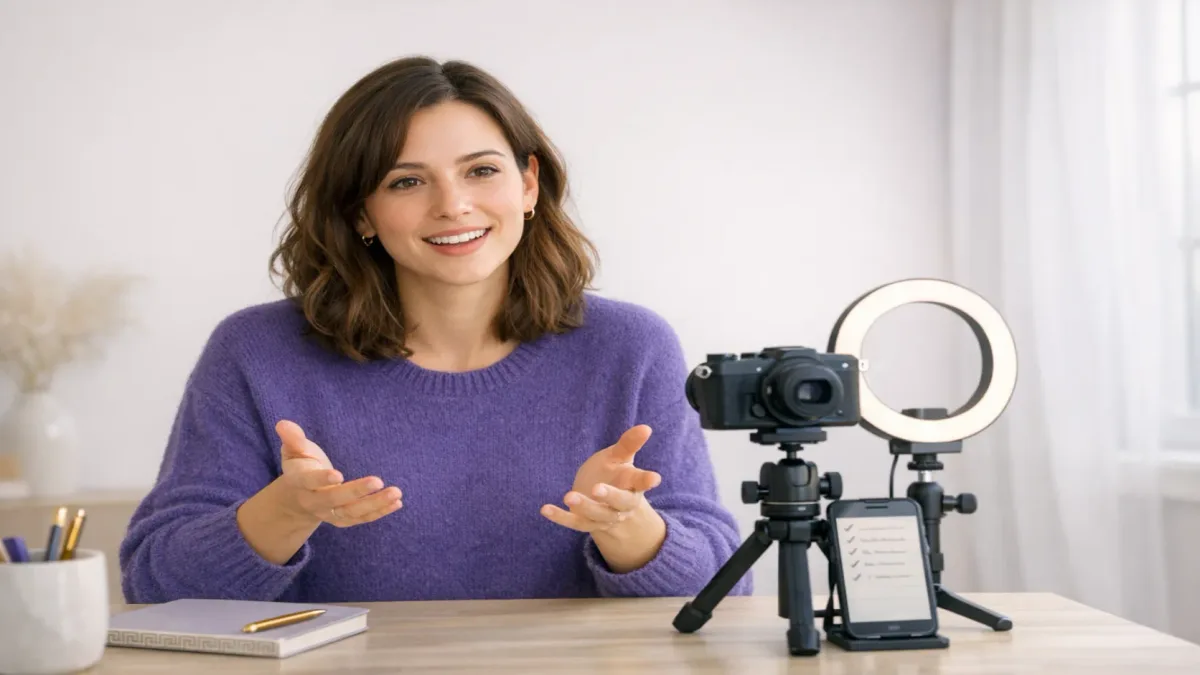
This guide is about talking to a camera when you record yourself: a course module, a LinkedIn or YouTube video, a Loom update for your team, a recorded presentation, a video cover letter. (If you landed here looking for the two-way talk button on a security camera, this isn't that.)
Plenty of people who are fine in a meeting freeze the moment the red light comes on. That's normal. A camera removes almost everything that keeps a conversation flowing: no faces nodding, no laughs, no puzzled looks to steer by. What's left is a small glass circle and, usually, a preview of your own face. This guide is a spoke of our pillar on how to speak with confidence. It focuses on what's specific to the lens.
Here's the process, in the order this guide covers it:
- Understand why talking to a camera feels strange, so you fix the cause rather than the symptom.
- Set the lens at eye height and frame your eyes on the upper third.
- Look just below the lens, and keep your notes and preview directly under it.
- Choose a delivery mode: full script, teleprompter, outline or riff.
- Talk to one imagined person, with energy a notch above conversation.
- Recover from mistakes by pausing and restarting the sentence.
- Shape the video for its format: Loom, LinkedIn, a course or a cover letter.
- Run a seven-day drill until the lens stops feeling like a lens.
Why does talking to a camera feel so awkward?
Talking to a camera feels awkward because you lose the feedback loop that normally regulates your speech. In conversation, listeners nod, smile and frown, and you adjust your pace and wording on the fly without noticing. A lens gives you none of that. Your brain reads the silence as disapproval, so you tighten up, speed up and flatten out.
Three things make it worse:
- The self-view. Most recording apps show your face while you talk. Watching yourself splits your attention between speaking and self-monitoring, which is the same mirror effect that makes video calls tiring. Our guide on how to be confident on video calls covers the live version.
- Permanence. A live conversation disappears. A recording can be replayed, which makes every stumble feel bigger than it is.
- No turn-taking. There's no natural pause where someone else speaks, so you either rush to fill the silence or run out of things to say.
None of this means you're bad on camera. It means the setup is missing parts a conversation has. Most of this guide is about putting those parts back.
How should you set up the camera?
Put the lens at your eye height, frame yourself so your eyes sit on the upper third of the shot, and sit or stand close enough that your head and shoulders fill most of the frame. Video-production teaching follows the same rule: eyes on the upper-third line rather than the centre of the frame. Too much empty space above your head makes you look small, and too little looks cramped (City College of San Francisco, Video Production Handbook).
The practical checklist:
- Lens at eye height. A laptop flat on a desk films up your nose and makes you look down at the viewer. Stack it on books, or put a phone on a tripod.
- Distance. About an arm's length for a laptop or phone. Closer distorts your face; much further and you lose expression.
- Light in front of you, not behind. Face a window or put a soft lamp behind the camera. A bright window behind you turns you into a silhouette.
- Sound beats picture. Viewers forgive soft video far more than echo or hiss. A cheap clip-on mic or a quiet, carpeted room does more than a better camera.
- Hide the self-view if you can. If you can't, shrink it and drag it directly under the lens. That brings us to where to look.
Where should you look when talking to a camera?
Look just below the lens, not straight into it, and never at your own face on the screen. In a 2024 eye-tracking study, viewers rated eye contact as most real when the speaker's gaze sat about 2 degrees below the camera, and still judged it as eye contact anywhere from 0 to 3 degrees below (Gao et al., "Don't Look at the Camera," arXiv preprint, 2024).
There's an older finding behind this. In 2002, Stanford researcher Milton Chen showed that people are far more forgiving of gaze that falls below the eyes than gaze that drifts left, right or above. Viewers tend to assume eye contact unless they're clearly sure it's absent (Chen, CHI 2002). Work cited in the 2024 study puts the point where eye contact breaks at roughly 4.5 degrees above the camera and 5.5 degrees below.
What this means in practice:
- Put anything you need to read directly under the lens. A sticky note with three bullet points, a teleprompter app, the recording preview. Never beside the camera, where a glance reads as looking away.
- Don't stare. Some advice says to break "eye contact" with the lens every few seconds, the way you would with a person. You don't need to. Natural glances down to think are fine; long looks sideways are what viewers notice.
- Far from the screen helps. The further you sit from the camera, the smaller the angle between the lens and the notes under it, so glancing down shows less.
Should you use a script, a teleprompter or an outline?
For most people, a short outline works best: three to five bullet points stuck just under the lens, with your first and last sentence written out in full. A word-for-word script tends to sound read, and a pure riff tends to ramble. Pick the mode by what the video needs.
| Delivery mode | Sounds like | Best for | Watch out for |
|---|---|---|---|
| Full script, memorised | Polished if well rehearsed | Short ads, 30-second intros | Takes many takes; sounds recited when nervous |
| Teleprompter | Smooth but flat if you're not careful | Courses, announcements, anything with exact wording | Eyes tracking side to side; reading voice. Mark emphasis and pauses in the script |
| Outline (3–5 bullets) | Natural, conversational | Loom updates, LinkedIn, most talking-head video | Occasional "um"; run a practice take first |
| Riff (no notes) | Most natural, least focused | Q&A, behind-the-scenes, casual content | Rambling and a missing ending |
If you use a teleprompter, put it as far from the camera as you can and make the text column narrow. The narrower the lines, the less your eyes sweep side to side. Write in short sentences, and mark where to pause and which word to stress, the same way you would for reading a speech without sounding like you're reading.
If you want to talk to a camera without a script, write only three things in full: the first sentence, the one line you want people to remember, and the last sentence. Improvise everything in between from bullets. Your opening and ending carry most of the impression, and they're where nerves cause the most damage.
How do you sound natural and confident on camera?
Talk to one specific person, not "an audience," and turn your energy up slightly past what feels normal. A camera flattens you, so vocal variety and facial movement that feel a bit much in the room usually read as normal on playback. Good on-camera speakers aren't calmer than you. They're slightly bigger.
The evidence points the same way. In 2014, a study of 6.9 million viewing sessions across four edX courses found that instructors who spoke fairly fast and with high enthusiasm held viewers better than slower, monotone ones (Guo, Kim & Rubin, ACM Learning@Scale, 2014). In MIT's write-up, the most engaging lecturers spoke at about 254 words per minute, and an informal seated-at-a-desk setup beat a podium (MIT News, 2014).
That doesn't mean you should race. Nervous speed and enthusiastic speed sound different. The fix for rushing is vocal variety and real pauses at the end of each idea, not a slower, flatter voice. Our guides on how to stop sounding monotone and how to stop talking too fast cover both sides.
Concrete ways to put a person back behind the lens:
- Picture one friendly listener. A colleague who likes your work, a friend who asked you this exact question. Say their name silently before you hit record.
- Tape a small photo just under the lens. A real face gives your brain the listener it's missing. Keep it below the lens, inside the zone where gaze still reads as eye contact.
- Talk with your hands. Gesturing loosens your voice. Frame the shot wide enough to include your hands at chest height. Our guide on what to do with your hands when public speaking covers what works.
- Smile before you start. A small smile in the first second sets a warm tone. You don't need to hold it.
- Stand up for high-energy videos. Standing puts more breath and movement into your voice than slouching in a chair.
Your face matters, but it doesn't do the teaching for you. In two large field studies with online learners, people who saw the instructor's face rated the lectures more positively. Showing the face constantly versus strategically made no difference to learning (Kizilcec, Bailenson & Gomez, Journal of Educational Psychology, 2015). Being on screen builds connection. A clear structure does the rest.
How do you stop feeling awkward on camera?
You stop feeling awkward on camera through repetition, not by waiting to feel ready. The discomfort comes from novelty and missing feedback, and both fade with reps. Most people notice a real difference after five to ten short recordings. The first one is always the worst.
Habits that speed it up:
- Treat take one as a warm-up. Decide in advance that you'll delete it. That takes the pressure off the first take, which is usually the stiffest.
- Record short. Two minutes, not twenty. Short takes mean more reps and less to lose when you stumble.
- Warm up your voice and face first. Hum, do a few lip trills, and say your opening line out loud twice before recording. Our vocal warm-ups for public speaking take about five minutes.
- Breathe out longer than you breathe in. A few slow breaths with a longer exhale settle a racing pulse before you start.
- Don't review while you record. Record three takes back to back, then watch. Reviewing after every take keeps you in critic mode.
When you do watch it back, use a short checklist rather than a general cringe. Our guide on how to record yourself speaking has a three-pass review method and a scorecard so takes are comparable.
What do you do when you mess up mid-take?
Stop, pause for two full seconds, look back at the lens, and restart the whole sentence, not just the missing word. The pause gives you a clean cut point when editing, and restarting the sentence keeps your intonation natural. Patching in a single word almost always sounds spliced.
If you're recording in one continuous take with no editing (a Loom, a one-way interview), don't stop at all for small slips. Viewers barely register a fluffed word. They do notice an apology. Correct it in the flow ("sorry, the March numbers") and keep going. If you lose your place entirely, pause, glance at your bullet, and pick up at the next point. Our guide on what to do when your mind goes blank has more recovery lines.
How should you talk to a camera for different kinds of video?
The basics stay the same, but the format changes the opening, the length and the energy. The 2014 edX analysis found engagement generally dropped off after about six minutes. Guidance from UC San Diego notes that this is an observed pattern, not a hard rule (UCSD Multimedia, video length best practices). Shorter almost always wins.
| Video type | Length that works | Open with | Energy and tone |
|---|---|---|---|
| Loom / async team update | 1–3 minutes | The decision or ask, in one sentence | Conversational; outline under the lens |
| LinkedIn or social talking-head | 30–90 seconds | A specific claim or question in the first 3 seconds | A notch above normal; standing helps |
| Course or training module | 3–6 minutes per video | What the viewer will be able to do by the end | Warm, enthusiastic, structured; teleprompter or outline |
| Recorded presentation | Same as live, cut by 20% | Your main point, not your agenda | Higher than live; vary slides and your face |
| Video cover letter / intro | 60–90 seconds | Who you are and the one thing you'd bring | Personal and specific; first and last line written out |
| One-way video interview | As the platform sets (often 1–3 minutes) | A direct answer to the question | Calm and clear; see below |
Recorded job interviews have their own rules: timers, think time and limited retakes. Those are covered in our guide to the one-way video interview. For recorded slide decks, our guide on how to give a virtual presentation covers switching between slides and camera.
A 7-day drill for talking to a camera
Seven short sessions are enough to make the lens feel ordinary. Each takes 10 to 15 minutes. Use the same setup every day so the only thing changing is you.
| Day | Record | Focus on |
|---|---|---|
| 1 | Two 60-second takes: what you did yesterday | Setup only: lens height, light, sound. Don't judge your delivery yet |
| 2 | Three takes explaining your job to a friend | Gaze: sticky note under the lens, eyes back to it after every glance |
| 3 | One topic, from a 3-bullet outline | Outline delivery: first and last sentence written, the rest improvised |
| 4 | The same topic, standing, with gestures | Energy a notch up; compare with day 3 |
| 5 | A 90-second "recorded presentation" with one deliberate mistake | Recovery: pause, eyes to lens, restart the sentence |
| 6 | A real video you need (a Loom, an intro, a post) | Use everything; three takes, keep the best |
| 7 | Rewatch day 1 next to day 6 | Note two things that improved and one to work on next |
Orator can help on the days in between. Practise the spoken part out loud, get feedback on pace, filler words and vocal variety, and walk up to the camera already warmed up.
Key takeaways
- Talking to a camera feels awkward because the lens gives no feedback. The fix is to put a listener back: picture one person, or tape a photo just under the lens.
- Set the lens at eye height and put your eyes on the upper third of the frame.
- Aim your gaze about 2 degrees below the lens. Keep notes and the preview directly under it, never beside it.
- Use a 3–5 bullet outline with your first and last sentence written out. Save full scripts for short, exact-wording videos.
- Raise your energy a notch. In a study of 6.9 million edX sessions, fast, enthusiastic instructors held viewers best.
- Treat take one as a warm-up, record short, and run seven short sessions to make the lens feel normal.
Frequently asked questions
How do you look at the camera when talking?
Look just below the lens rather than straight into it. A 2024 eye-tracking study found viewers rated eye contact as most natural when the speaker's gaze was about 2 degrees below the camera. Put your notes or preview window directly under the lens so glancing at them still reads as eye contact. Avoid looking at your own face on screen.
How can I be natural on camera?
Talk to one specific person you picture behind the lens, use an outline instead of a script, and gesture as you would in conversation. Turn your energy up slightly, because a camera flattens you. Treat the first take as a warm-up and record several short takes. Feeling natural comes from repetition, usually within five to ten recordings.
How do I talk to a camera without a script?
Write three things in full: your first sentence, the one line you want remembered and your last sentence. Put three to five bullet points on a note just under the lens and improvise between them. This keeps you conversational without rambling. If you lose your place, pause, glance at the next bullet and continue.
How do I stop being awkward on camera?
Awkwardness on camera comes from missing feedback and from watching yourself. Hide or shrink the self-view, picture a friendly listener, and record short takes back to back without reviewing between them. Delete take one by default. Most people feel noticeably more comfortable after a week of short daily recordings.
How do I be confident on camera if I hate how I look and sound?
Almost everyone dislikes their recorded voice at first, because you normally hear it through your skull as well as the air. Give it a few sessions and the shock fades. Judge your recordings on a checklist (eye line, pace, clarity of your main point) instead of on how you look. Confidence follows competence you can see improving.
Conclusion
Talking to a camera is awkward because the lens takes away the listener, not because you're bad at it. Put the listener back with your eye line, an outline and one imagined person, then let repetition do the rest. Set up your camera today, put a sticky note under the lens and record two minutes you're going to delete.